A journal for your spiders
Feedings, moults, rehousings and growth for every animal. The app reminds you who needs feeding today.
Free · No account needed · Works offline

Everything a keeper needs, in one place
The animal card
Photo, species, sex, stage, size. The species is read from the picture, the husbandry fills itself in. Every moult with its photo and size, the growth chart draws itself.
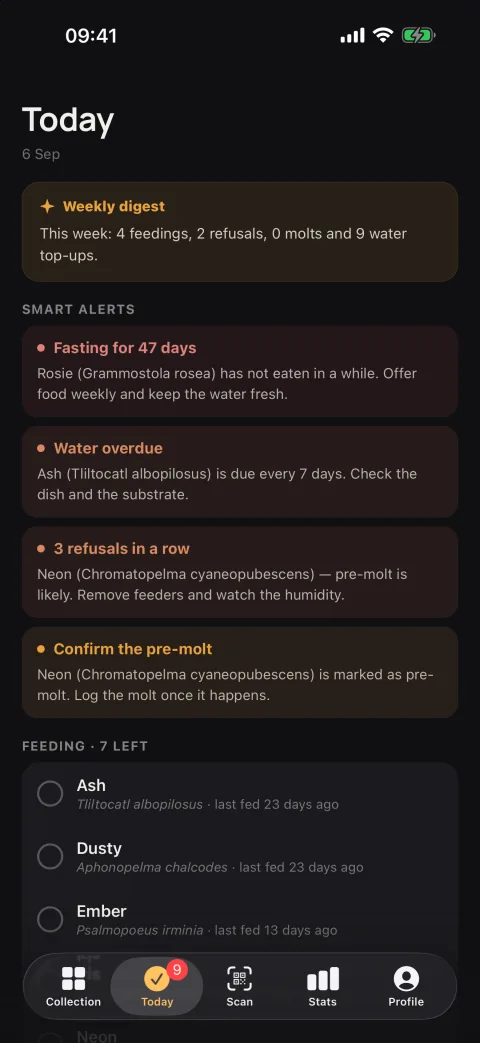
Today’s tasks and alerts
Who to feed, whose water to top up, one tap. Not eating for 40 days? The app looks at the photo and the journal and says: most likely pre-moult, and what to do next.
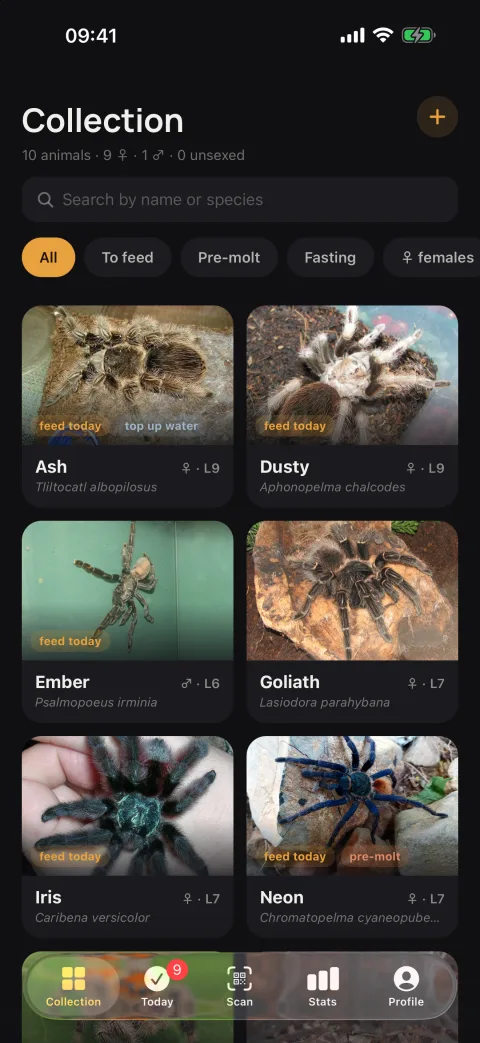
The collection at hand
Every animal on one screen: photo, species, stage, who needs what today. Filters for feeding, pre-moult and fasting, search by name or species.
QR labels on enclosures
The sticker prints from the app. Scanning opens the card, a feeding is logged in a second.
Collection statistics
Genera, a month of activity, moult cycles — the whole picture at once.
Works offline
Everything lives on the device. Sign in and the collection follows you between phones.
Public pages
Any animal can have a page with its photographs and growth by moult, by link or from the label on the enclosure.
Seven languages
English, Russian, Ukrainian, German, Polish, Czech, Portuguese.
Getting started is quick
- 1
Add an animal
Name, species from a photograph or the catalogue, sex and stage. Half a minute.
- 2
Log what happens
Fed, refused, moulted, rehoused: one tap each, with a photo if you like.
- 3
Read what it tells you
Who needs feeding today, who is due water, and who is probably heading into a moult.
What is Exuvia?
A keeping journal for spiders on iOS and Android. Every animal has a card of its own: species, sex, moults and size, with the history of feedings, waterings and rehousings. The app tells you who needs feeding today.
Which spiders can I keep in it?
Any. Tarantulas, jumping spiders, true spiders: the catalogue holds 53 550 species, the whole order, with husbandry notes for many of them.
Is Exuvia free?
Yes. The app is free. No account is required, the journal lives entirely on the phone.
Does it work offline?
Yes. Everything is stored on the device and logging a feeding needs no connection. Sign in and the collection syncs between phones and is backed up.
Do I need an account?
No, the journal works without one. Signing in adds sync between devices, a backup, public pages for your animals and the AI condition analysis.
What does the AI do?
Two things. When you add an animal, it names the species from a photograph. Later it reads a photo alongside the feeding and moulting history and tells pre-moult from a problem, for instance when a spider has refused food for forty days.
How does the app know how a species is kept?
Humidity, temperature and feeding rhythm are written once per species and shared by everyone keeping it. With every moult the app moves the feeding interval on to the new stage.
What are the QR labels?
A code you print and stick on the enclosure. Scanning it opens the animal's card, so a feeding is logged in seconds. The same code can lead a visitor to the spider's public page.
Can I show a spider to friends?
Yes. Any animal can have a public page with its photographs and growth by moult. It opens by link or from the label on the enclosure, and you can close it at any time.
What does “exuvia” mean?
The exuvia is the old skin a spider leaves behind when it moults. Every moult is a step in the journal: a new instar, a new size, a new point on the growth chart.
How do I install it?
On iPhone from the App Store, on Android from Google Play — like any other app. How to install →